

The Gentleman Jim Casino app brings the full casino and sportsbook to iPhone and Android phones, using the same account, balance and promotions as the desktop site. It is free to download from the App Store and Google Play, and a responsive browser version covers every other device. This page compares the two ways to play, lists what works where, looks at mobile sports betting and walks through the everyday experience of the Gentleman Jim Casino mobile layout, from the first tap to a finished withdrawal request.
App or Browser at Gentleman Jim
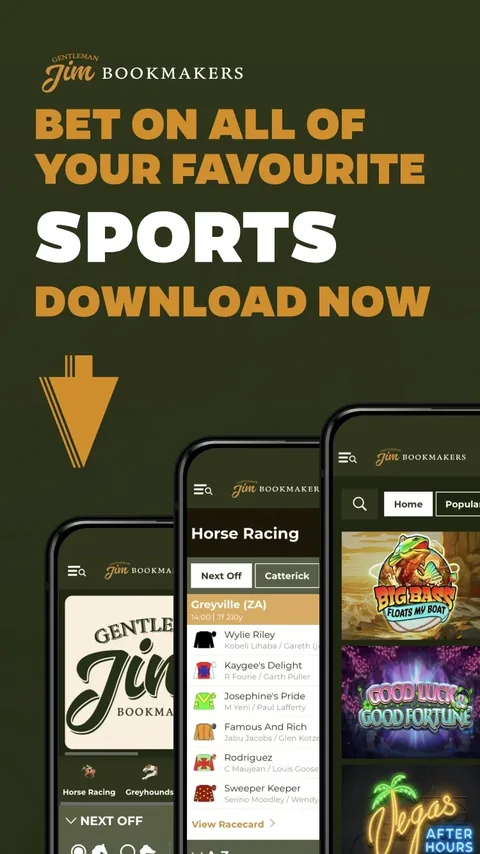
Both routes lead to the same Gentleman Jim games and the same wallet, so the choice comes down to habits. The native app suits regular players: it remembers the login, supports Touch ID, and places sports, in-play, racing, casino and live casino in a fixed bottom bar, so any section is one tap away. Pages switch faster than in a browser, which is most noticeable during busy race meetings when prices update every few seconds. Saved preferences keep favourite settings in place between sessions, and the same account menu handles deposits, withdrawals and bet history. Racing fans also get live streams inside the app, so the race and the betslip share one screen, which is the main reason regular punters prefer it to the browser.
The Gentleman Jim browser version needs no download at all. It adapts to any screen size, keeps the login and betslip in easy reach, and is the better choice on a shared tablet or a work phone where installing apps is not possible. There is no separate file to hunt for on Android: the official app comes from Google Play, and on iPhone the Gentleman Jim iOS app installs from the App Store like any other. Anything offered as a direct download from another website is not the official version and should be avoided. With automatic updates switched on in the phone's store settings, the Gentleman Jim app always runs the latest version without any manual steps, and the browser version is updated centrally so it never needs attention at all.
Device Compatibility
The Gentleman Jim app and browser version cover every common device, and the table below shows the best route for each. Keeping the app updated is the only real requirement, because updates arriving through the store bring new games, security fixes and layout improvements in one go.
| Device | How to access | Key extras |
|---|---|---|
| iPhone and iPad | App Store app | Touch ID sign-in and racing streams |
| Android phones | Google Play app | Saved login and racing streams |
| Any tablet | Mobile browser | Full casino and sportsbook |
| Desktop computer | Web browser | Largest view of racecards |
Older phones that can still install the current Gentleman Jim store versions handle the app comfortably, because games load on demand rather than being stored on the device. Live dealer tables stream smoothly on both Wi-Fi and 4G, and racing streams run in the same player on every device.
Gentleman Jim Mobile Sports Betting
Gentleman Jim started life as a bookmaker, and the mobile sportsbook shows it. Horse racing and greyhound racing stream live inside the app, racecards list runners with their jockeys and trainers, and a live tracker follows tennis and football matches in real time. Football coupons carry popular markets such as Over/Under 2.5 Goals, Draw No Bet and First Half Result, all visible at a glance on the England Premier League page.
Placing a bet takes a couple of taps: choose a price, enter the stake on the betslip and confirm. Because casino and sport share one balance, winnings from a race can go straight into a slot session, or the other way round, without transfers. The Gentleman Jim Casino mobile header keeps the Bets counter in view, so a pending selection never gets lost while browsing other markets.
Everyday Use and Speed
Speed is where the Gentleman Jim app earns its place. Slots open within seconds on a normal 4G or Wi-Fi connection, and live dealer tables from Pragmatic Play Live stream smoothly on both. Menus are uncluttered, with a search bar and provider filter in the casino lobby, and the Casino Mini Games panel offers quick instant games between races for players who want a short break from the racecard.
Gentleman Jim account tools sit in the same place on every device. Deposits, withdrawals, bet history, deposit limits, time-outs and session reminders are all available from the account menu, so managing play on the move is as easy as at a desk. Each setting takes effect straight away and applies across the Gentleman Jim app, the browser and the desktop site at the same time.
The Gentleman Jim home screen is also built for quick checks between races. The next races off appear at the top, the Casino Mini Games panel sits alongside them, and the Bets icon stays in the header, so a player can check a price, spin a slot and return to the racecard without losing their place.
Frequently Asked Questions
Is the Gentleman Jim iOS app free?
Yes. It is a free download from the App Store, and the Android version is free on Google Play.
Is the Gentleman Jim Casino app different from the website?
The games, balance and promotions are identical. The app adds Touch ID sign-in and a fixed bottom menu.
Can I watch races on my phone?
Yes. Horse racing and greyhound racing stream live in the app and in the mobile browser.
Does the Gentleman Jim app include the live casino?
Yes. Around 60 Pragmatic Play Live tables stream in the app on Wi-Fi and 4G.
Do I need a separate account for mobile?
No. One Gentleman Jim account works on every device with the same login details.
